

4 ways to use FinishLine during the COVID-19 crisis
May 12, 2020
6 Things Your Punch List Software Must Have
June 23, 20204 ways to use FinishLine during the COVID-19 crisis
May 12, 20206 Things Your Punch List Software Must Have
June 23, 2020USE PUNCH LIST DATA TO MAKE DECISIONS


When punch list and inspection items are recorded in FinishLine Software, it becomes powerful information in a searchable database. While punch list data is a valuable resource, it can be overlooked as projects are in motion. Routine data checks help to identify positive trends and potential issues so you can make better informed decisions, which ultimately save time and money.
Read on to see how punch list data in FinishLine can be used help to make decisions.
Identifying spikes of repetitive issues can help to solve problems before they become larger and more expensive issues, such as superficial appliance damage (image below). A punch list item like a scratch to a stove in multi-family projects is likely, but if that issue becomes repetitive, the root cause should be identified. Use FinishLine to document appliance conditions with photos upon delivery and after installation to remove the guesswork.
Build CollaborationReviewing punch list data can feel like you are working in a silo, but proactively sharing and analyzing data among your stakeholders can foster a collaborative environment. Share data visually by including FinishLine Dashboard Widgets (PDF or PNG file) in emails or in your OAC reports to get everyone on the same page.

Schedule automatic reports to be sent to your email inbox and to other team members. Reviewing reports can help uncover issues like missing fixtures or routinely damaged casework to avoid costly repairs. This takes the guess work out of reviewing the data on a regular basis, so it’s more likely to become a routine habit.
Dig DeeperMetrics reports can be an effective tool in noting QA/QC trends, but you can gain additional insights by analyzing data in different ways. FinishLine can be modified to focus on specific types of data on Plan Views or for specific Inspection Types. Then, take it a step further by downloading report data to Excel and take a better look at project trends.
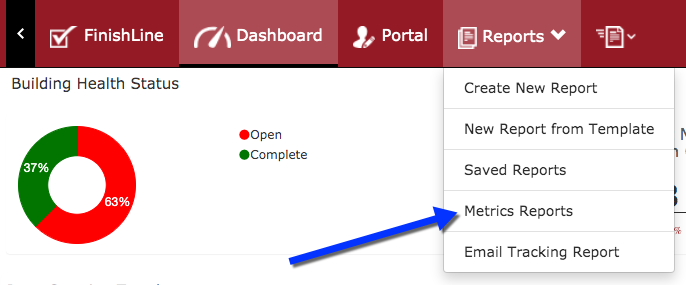
Access Metrics reports in the FinishLine Dashboard
Data can be intimidating at first glance, but it will become more familiar with time. Using punch list data helps to back up decisions when rolling out changes. Reviewing trends will also determine if the implemented changes are having a positive or negative impact on the project. Want to learn more about punch list data in FinishLine? Contact us, we’re here to help.
Punch list data is a valuable resource which can be overlooked as projects are in motion.